Redis 응용
분산 Session 관리
분산 서버 환경에서 Load Balancing을 수행 시 여러 개의 서버는 사용자의 Session 정보를 동기화하여 관리하기 어렵다. 즉, 서버 A에서 저장된 Session 정보가 서버 B에는 반영이 안될 수 있다.
이러한 분산 환경에서의 Session 관리 법을 알아보자.
Sticky Session
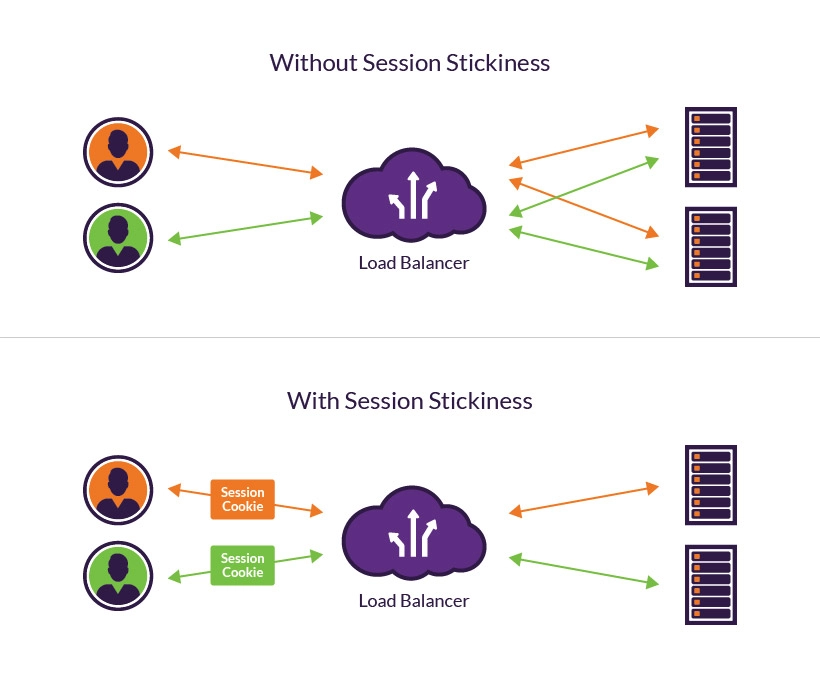
Sticky Session은 로드밸런서가 클라이언트의 첫 요청을 처리했던 특정 웹 서버로 이후의 모든 요청을 고정해주는 부하 분산(Load Balancing) 방식이다. 간단하게 알아보자.
- 장점
- 서버 로컬 메모리를 그대로 사용하기 때문에 조회 속도가 빠름
- 백엔드 코드 수정 없이 Load Balancer 설정으로 적용 가능
- 단점
- 특정 서버로 트래픽이 몰릴 수 있어 로드밸런싱 효율이 떨어짐
- 서버가 다운되면 사용자 세션이 유실될 수 있음
- 적용법
- Nginx Upstream 설정 시 ip_hash 키워드 사용
- WAS 클러스터링 기능으로 세션 데이터 복제하여 동기화
Session Clustering
Session Clustering은 여러 대의 웹 서버가 네트워크를 통해 서버 간 세션 데이터를 외부 저장소를 사용하여 공유한다.
- 세션 유실을 방지할 수 있음
- 수평적 확장(Scale-out)에 유리함
Redis를 활용해 세션 저장소로 활용하여 Session Clustring을 적용할 수 있다.
Spring Session을 사용할 경우 내장 Tomcat의 세션 기능을 사용하지 않고 Redis에 별도로 세션을 저장하게 된다.
- build.gradle
dependencies {
    implementation 'org.springframework.boot:spring-boot-starter-data-redis'
    implementation 'org.springframework.session:spring-session-data-redis'
}
Sorted Set 리더보드
리더보드 기능이란 실시간 랭킹을 보여주는 기능을 말한다. 게임이라면 점수 순위, 검색 엔진이면 실시간 검색 순위, 그리고 이커머스 분야라면 인기상품과 같은 기능들을 보여주기 위해 사용할 수 있다.
- 장점
- RDBMS로 구현할 경우 복잡한 Join, 집계함수가 필요, Redis를 사용하면 빈번한 조회와 수정에 유리함
리더보드 예제
application.yml, build.gradle, RedisTemplate 등의 기본 설정은 생략한다. (다음 포스팅 참조 https://nohumbit.tistory.com/61)
[Spring boot] Redis, In-memory DB
Redis소개Redis 라이센스 이슈2024년 3월 20일 후로 완전한 오픈소스 라이센스인 BSD에서 특정한 경우의 상업화를 방지하는 AGPL, RSAL, SSPL 라이센스로 변경되었다.다만 평소와 같이 서비스의 내부에서
nohumbit.tistory.com
- ItemDto.java
public record ItemDto (
    Long id,
    String name,
    String description,
    Integer price,
) {
    public ItemDto fromModel(Item item){
        return new ItemDto(
            item.id(),
            item.name(),
            item.description(),
            item.price()
        );
    }
}- RedisConfig.java
@Configuration
public class RedisConfig {
    // ...

    @Bean
    public RedisTemplate<String, ItemDto> rankTemplate (
      RedisConnectionFactory redisConnectionFactory
    ) {
    RedisTemplate<String, ItemDto> template = new RedisTemplate<>();
    template.setConnectionFactory(redisConnectionFactory);
    template.setKeySerializer(RedisSerializer.string());
    template.setValueSerializer(RedisSerializer.json());
    return template;
    }
}- ItemService.java
@Slf4j
@Service
@RequiredArgsConstructor
public class ItemService {
    private final ItemRepository itemRepository;
    private final OrderRepository orderRepository;
    private final ZSetOperations<String, ItemDto> rankOps;

    public ItemService(
            ItemRepository itemRepository,
            OrderRepository orderRepository,
            RedisTemplate<String, ItemDto> rankTemplate
    ) {
        this.itemRepository = itemRepository;
        this.orderRepository = orderRepository;
        this.rankOps = rankTemplate.opsForZSet()
    }

    public void purchase(Long id) {
        Item item = itemRepository.findById(id)
                .orElseThrow(() -> new ResponseStatusException(HttpStatus.NOT_FOUND));
        orderRepository.save(ItemOrder.builder()
                .item(item)
                .count(1)
                .build());

      // ZINCRBY soldRanks 1 (ItemDto JSON)
        rankOps.incrementScore(
                "soldRanks", // Sorted-Set Key 이름
                ItemDto.fromModel(item),
                1
        );
    }

    public List<ItemDto> getMostSold() {
        // ZREVRANGE soldRanks 0 9
        Set<ItemDto> ranks = rankOps.reverseRange("soldRanks", 0, 9);
        if (ranks == null) return Collections.emptyList();
        return ranks.stream().toList();
    }
}
Redis 캐싱 전략
Redis가 많이 활용되는 또다른 주제는 캐싱(Caching)이다. 이는 자주 사용되는 데이터를 더 빠른 캐시(Cache)에 저장하는 기법을 말한다.
캐싱에 대한 자세한 설명은 생략하고 Redis를 활용한 캐싱에 대해 바로 알아보자.
캐시 동작 지표
캐시를 구현하고 사용할 때는 해당 데이터가 얼마나 자주 사용되는지 고려해야 한다. 이를 아래 세가지의 동작 지표로 나뉜다.
- 캐시 적중 (Cache Hit)
- 캐시에 접근 시 찾는 데이터가 있는 경우
- 캐시 누락 (Cache Miss)
- 캐시에 접근 시 찾는 데이터가 없는 경우
- 삭제 정책 (Eviction Policy)
- 캐시에 공간이 부족할 때 공간 확보 정책
Cache-Aside
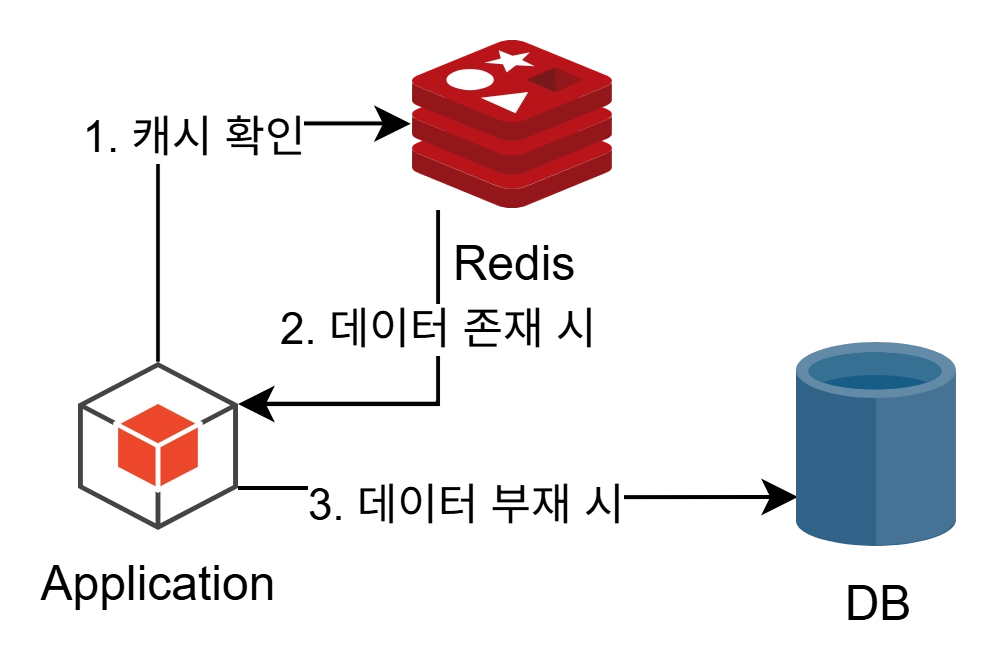
Lazy Loading이라고도 하며, 데이터를 조회할 때 항상 캐시를 먼저 확인하는 읽기 전략이다.
캐시에 데이터가 있으면 캐시에서, 없으면 원본 저장소에서 데이터를 가져온 후 캐시에 저장한다.
- 특성
- 필요한 데이터만 캐시에 보관
- 최초 조회 요청은 추가 동작이 필요
- 데이터가 최신이라는 보장이 없음
Write-Through
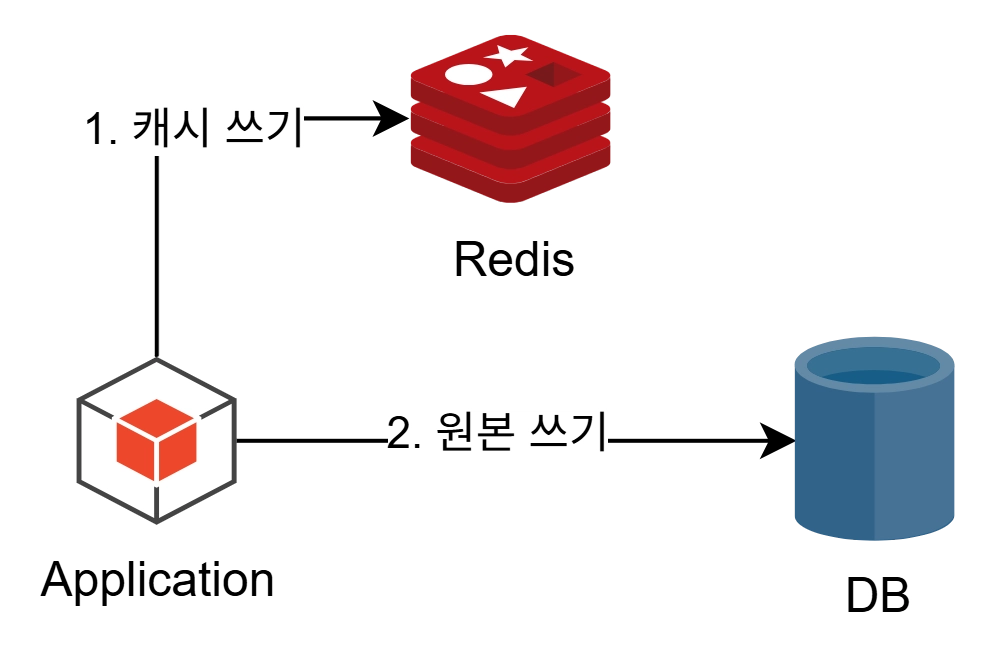
데이터 작성 시 항상 캐시에 작성하고, 원본에도 작성하는 쓰기 전략이다.
- 특성
- 캐시의 데이터 상태를 항상 최신으로 보장
- 쓰기 동작이 항상 중복되기 때문에 추가 동작이 필요
- 쓰기 동작이 잦을 경우 오버헤드가 발생할 수 있음
Write-Behind
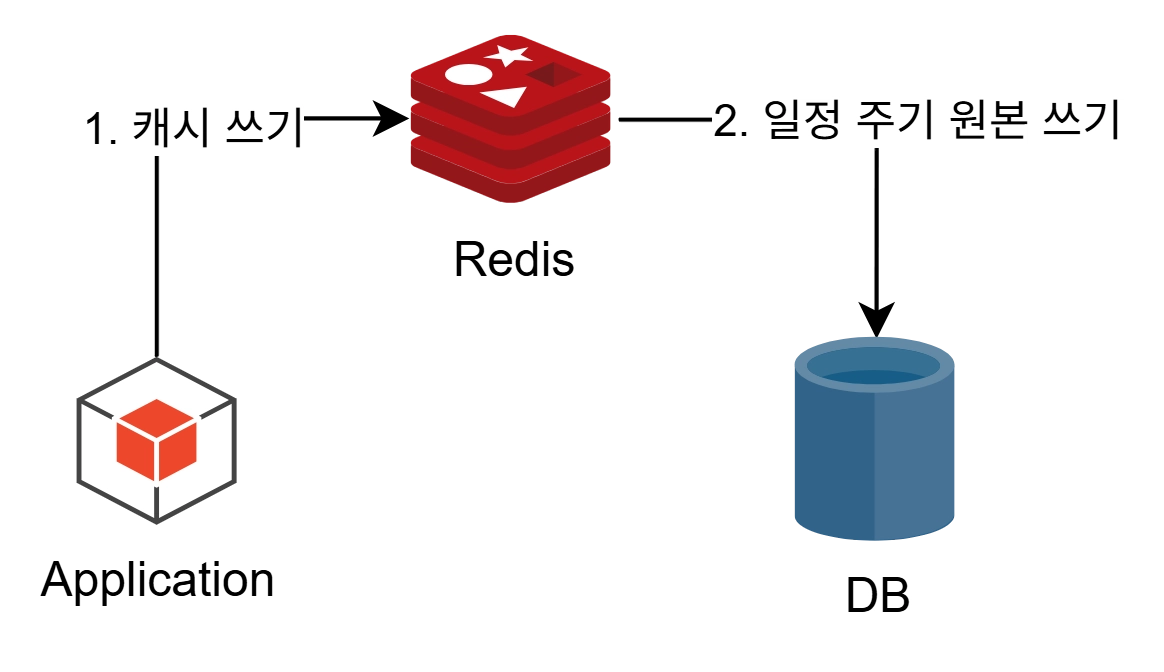
캐시에만 데이터를 작성하고, 일정 주기로 원본을 갱신하는 쓰기 전략이다.
- 특성
- 쓰기가 잦은 상황에 데이터베이스의 부하를 줄일 수 있음
- 캐시의 데이터가 원본에 적용되기 전 문제가 발생하면 데이터 소실의 위험성이 존재
Spring Cache
Spring 내부에서도 라이브러리를 통해 간단하게 구성할 수 있다.
Spring Cache 적용
@Cacheable이 포함되면 CacheConfig의 설정대로 동작한다.
읽기 동작(@Cacheable)은 Cache-Aside 방식으로, 쓰기 동작(@CachePut)은 Write-Through 방식으로 동작한다.
@CacheEvict는 원본 데이터 수정 시 캐시를 무효화한다.
- CacheConfig.java (로컬 메모리 캐시)
@Configuration
@EnableCaching
public class CacheConfig {
}

// Redis 의존성이 있을 경우 자동으로 Redis Cache로 적용됨- CacheConfig.java (Redis 연동 캐시)
@Configuration
@EnableCaching
public class CacheConfig {
  @Bean
  // CacheManager로 진행해도 정상 동작
  public RedisCacheManager cacheManager(
            RedisConnectionFactory redisConnectionFactory
  ) {
      // Spring Cache와 Redis 연동
    RedisCacheConfiguration configuration = RedisCacheConfiguration
            .defaultCacheConfig()
            // null을 캐싱 할것인지
            .disableCachingNullValues()
            // 기본 캐시 유지 시간 (Time To Live)
            .entryTtl(Duration.ofSeconds(10))
            // 캐시를 구분하는 접두사 설정
            .computePrefixWith(CacheKeyPrefix.simple())
            // 캐시에 저장할 값을 어떻게 직렬화 / 역직렬화 할것인지
            .serializeValuesWith(
                        SerializationPair.fromSerializer(RedisSerializer.java())
            );

        return RedisCacheManager
                        .builder(redisConnectionFactory)
            .cacheDefaults(configuration)
            .build();
    }
}- read(), readAll()
// cacheNames: 메서드로 인해서 만들어질 캐시를 지칭하는 이름
// cacheName = itemCache::1, itemCache::2
// key: 캐시에서 데이터를 구분하기 위해 활용할 값
// key = "args[0]" : 첫번째 인자
@Cacheable(cacheNames = "itemCache", key = "#id")
public ItemDto readOne(Long id) {
    return repository.findById(id)
            .map(ItemDto::fromEntity)
            .orElseThrow(()
                    -> new ResponseStatusException(HttpStatus.NOT_FOUND));
}

// itemAllCache::readAll
@Cacheable(cacheNames = "itemAllCache", key = "#root.methodName")
public List<ItemDto> readAll() {
    return repository.findAll()
            .stream()
            .map(ItemDto::fromEntity)
            .toList();
}- create()
// itemCache::1
@CachePut(cacheNames = "itemCache", key = "#result.id")
public ItemDto create(ItemDto dto) {
    return ItemDto.fromEntity(itemRepository.save(Item.builder()
            .name(dto.getName())
            .description(dto.getDescription())
            .price(dto.getPrice())
            .stock(dto.getStock())
            .build()
    ));
}- update(), delete()
// itemCache::1
@CachePut(cacheNames = "itemCache", key = "#id")
@CacheEvict(cacheNames = "itemAllCache", allEntries = true)
public ItemDto update(Long id, ItemDto dto) {
    Item item = itemRepository.findById(id)
                    .orElseThrow(() -> new ResponseStatusException(HttpStatus.NOT_FOUND));
    item.setName(dto.getName());
    item.setDescription(dto.getDescription());
    item.setPrice(dto.getPrice());
    item.setStock(dto.getStock());
    return ItemDto.fromEntity(itemRepository.save(item));
}

@CacheEvict(cacheNames = "itemCache", key = "#id")
@CacheEvict(cacheNames = "itemAllCache", allEntries = true)
public void delete(Long id) {
    Item item = itemRepository.findById(id)
                    .orElseThrow(() -> new ResponseStatusException(HttpStatus.NOT_FOUND));

    itemRepository.delete(item);
}- searchByName()
@Cacheable(
        cacheNames = "itemSearchCache",
        key = "{ #keyword, #pageable.pageNumber, #pageable.pageSize, #pageable.sort }"
)
public Page<ItemDto> searchByName(String keyword, Pageable pageable) {
    return itemRepository.findAllByNameContains(keyword, pageable)
            .map(ItemDto::fromEntity);
}
'IT > Spring Boot' 카테고리의 다른 글
| [Spring boot] 트랜잭션 격리 수준과 Spring boot 트랜잭션 전파 속성 (0) | 2026.09.19 |
|---|---|
| [Spring boot] LLM 실무 활용법과 Spring AI (0) | 2026.08.08 |
| [Spring boot] Redis, In-memory DB (0) | 2026.07.31 |
| [Spring boot] Apache Kafka (0) | 2026.07.28 |
| [Spring boot] RabbitMQ (0) | 2026.07.27 |